Network ATC 101
Table of Contents
Preface
This is a 100% under construction page, but I wanted to start collecting some of the examples of different intents I’ve done.
Network ATC is awesome, but not especially beginner friendly, so lets see if I can help out a little bit. Network ATC is going to help deploy consistent networking across all hosts in a cluster, and prevent configuration drift. Awesome! But, it also needs every host to be configured the same. Think of this as Infrastructure As Code for Host networking. Allegedly, Network ATC is not an acronym, however some of the imagery published includes airplanes. Read into that as you will.
Pre-Reqs
- Windows Server 2025 Datacenter, or Azure Local 2311.2 or newer.
- All Nics in an intent must be the same Make, Model, Speed, etc.
- All Nics in an intent must be named identical across all nodes in the cluster.
- The following roles must be installed: Network ATC, Hyper-V, Failover Clustering, Data Center Bridging, FS-SMBBW
Intent types
There are really three intent types commonly used. An intent must have at least one type, but can have multiple.
- Compute: The compute intent type creates a Hyper-V switch for VM traffic.
- Management: Also creates a Hyper-V switch, but creates a virtual management adapter for the Host OS.
- Storage: This is going to be for SMB/RDMA traffic. Primarily for S2D storage and Live Migration between nodes. Now, I said you can mix and match but there are some limits. You can only have one management intent, and you can only have one storage intent. You can have “unlimited” compute intents, but you’re obviously going to hit some limits with how many physical nics you can get in a node. There is also a “stretch” intent type for S2D stretched clusters, but that’s in a bit of a funny spot right now, so I’ll pretend that doesn’t exist. Many people are still doing “fully Converged” intents, with all three* traffic types in a single intent. This normally works, but you’re going to end up relying on QoS to properly prioritize storage, compute, and management traffic between your nodes. With modern PCIe Gen5 NVMe drives you can hit 100Gbps off a single drive, so any high performance clusters you’re going to want a decent bit of bandwidth allocated for that storage intent. If at all possible keep your storage intent separate, but I have no concerns doing management and compute on the same intent. You can specify a vlan tag for your management traffic when you create the intent.
Overrides
Network ATC has it’s defaults for everything out of the box, but they may not perfectly fit your environment.
- Global Overrides configure things like “Maximum VM Migrations” and “Live Migration Performance Selection”
- Adapter Property Overrides configure things like RDMA Protocol, Jumbo Packet size, etc.
- Storage Overrides configure things like Automatic IP Generation
- QOS Policy Overrides configure… you guessed it, QOS Policies
Renaming Network Adapters
As I said, all adapters across the cluster need to be named the same, so if it helps you can pretty easily rename your adapters. You will need to substitute the proper -NewName depending on the order in which your adapters got named by default. You can see in this screenshot that the adapters on this node got added in a different order.
1Get-NetAdapter | Sort Name
2
3Rename-NetAdapter -Name 'Ethernet' -NewName 'CX4-1'
4Rename-NetAdapter -Name 'Ethernet 2' -NewName 'CX4-2'
5Rename-NetAdapter -Name 'Ethernet 3' -NewName 'X710-1'
6Rename-NetAdapter -Name 'Ethernet 4' -NewName 'X710-2'
7Rename-NetAdapter -Name 'Ethernet 5' -NewName 'TB1'
ATC Examples / commands
Command Basics
Here’s the basic powershell commands for NetATC.
 1Get-NetIntent
 2#Get-NetIntent will provide the configuration information of the current intents
 3
 4Get-NetIntentStatus
 5#Get-NetIntentStatus will provide status of the intents applying to each node in the cluster
 6
 7Get-NetIntent -GlobalOverrides
 8#Get-NetIntent -GlobalOverrides will provide information about any global overrides that are configured. This info is not included in the base "Get-NetIntentStatus"
 9
10Add-NetIntent
11#Add-NetIntent will create a new Network ATC Intent
12
13RemoveNetIntent
14#Remove-NetIntent will... remove a Network ATC Intent
15
16Set-NetIntent
17#Set-NetIntent will change the configuration of an existing Intent
18
19Set-NetIntentRetryState
20#When things get messed up, and your intent fails to apply, this is how you make it retry.
Basic Fully-Converged (Storage, Compute, Management)
1Add-NetIntent -Name ConvergedIntent -Management -Compute -Storage -AdapterName CX4-1, CX4-22-node “switchless”, Management on vlan 50
 1$MgmtAdapterPropertyOverrides = New-NetIntentAdapterPropertyOverrides
 2$MgmtAdapterPropertyOverrides.NetworkDirect = 0
 3$MgmtAdapterPropertyOverrides.JumboPacket = 1514
 4$StorAdapterPropertyOverrides = New-NetIntentAdapterPropertyOverrides
 5$StorAdapterPropertyOverrides.JumboPacket = 9014
 6#RoCEv2=4, iWARP=1
 7$StorAdapterPropertyOverrides.NetworkDirectTechnology = 4
 8$StorageOverride = New-NetIntentStorageOverrides
 9$StorageOverride.EnableAutomaticIPGeneration = $false
10
11Add-NetIntent -Name Management_Compute -Management -Compute -AdapterName X710-1, X710-2 -ManagementVlan 50 -AdapterPropertyOverrides $MgmtAdapterPropertyOverrides
12
13Get-NetIntent
14
15Add-NetIntent -Name Storage -Storage -AdapterName CX4-1, CX4-2 -AdapterPropertyOverrides $StorAdapterPropertyOverrides -StorageOverrides $StorageOverride
3-node “Switchless”, Management on vlan 50
Manually setting IPs
I fully took this from Dell posted here: https://www.dell.com/support/manuals/en-us/ax-760/ashci_deployment_option_guide_switchless/setup-ips-manually-on-smb-nics?guid=guid-bda01b60-8132-405d-8ef2-69420433c1f8&lang=en-us
 1param
 2 (
 3     [Parameter(Mandatory = $true)]
 4     [Int]
 5     $NodeID
 6 )
 7
 8 $SwitchlessNodeID = ${NodeID} #Update to the current Node number being configured.
 9 $SwitchlessClusterNodes = 3 #Edit with number of nodes in the cluster.
10
11 ##############################################
12 #Setup Storage Network for Switchless Topology
13 ##############################################
14 $StorageSubnet = '172.16.0.0'
15 $SingleStorageIPAddress = @('172.16.12','172.16.13','172.16.14','172.16.23','172.16.24','172.16.34')
16 $DualStorageIPAddress = @('172.16.21','172.16.31','172.16.41','172.16.32','172.16.42','172.16.43')
17 $StorageAddressPrefix = 29
18 $supportedAdapters = @("Mellanox", "QLogic", "E810")
19 $StorageAdapter = Get-NetAdapter | Where InterfaceDescription -Match ($supportedAdapters -Join "|") | ? Status -like Up | sort Name | Get-NetAdapterHardwareInfo | ? Slot -GE 1 | Sort-Object Slot,Function
20 if ( $StorageAdapter ) {
21     Write-Output 'These adapters will be used for storage (dependent on cluster size):'
22     Write-Output $($StorageAdapter | Format-Table Name,Description,Slot,Function)
23     Pause
24 } else {
25     throw 'No RDMA Storage Adapters found!'
26 }
27
28 $SingleStorageIPAddress = $SingleStorageIPAddress | ForEach-Object { if (($_).Substring(($_).Length -2) -match $SwitchlessNodeID) { $_ } }
29 $DualStorageIPAddress = $DualStorageIPAddress | ForEach-Object { if (($_).Substring(($_).Length -2) -match $SwitchlessNodeID) { $_ } }
30 $SingleStorageIPAddress = $SingleStorageIPAddress | ForEach-Object { $_ + '.' + $SwitchlessNodeID }
31 $DualStorageIPAddress = $DualStorageIPAddress | ForEach-Object { $_ + '.' + $SwitchlessNodeID }
32 $StorageSubnet = $StorageSubnet.Split('.')[0] + '.' + $StorageSubnet.Split('.')[1]
33 $SingleStorageIPAddress = $SingleStorageIPAddress | ForEach-Object { $_.Replace('172.16',$StorageSubnet) }
34 $DualStorageIPAddress = $DualStorageIPAddress | ForEach-Object { $_.Replace('172.16',$StorageSubnet) }
35 Write-Output "Storage IP Addresses: $(($SingleStorageIPAddress)[0..($SwitchlessClusterNodes -2)]) ($(($DualStorageIPAddress )[0..($SwitchlessClusterNodes -2)]))"
36 Pause
37 ##
38
39 #################################
40 ## Assign IPs for Storage Network
41 #################################
42 if ( ($SwitchlessClusterNodes -1) -le $StorageAdapter.Count ) {
43     Write-Output 'Configuring Single-Link Full Mesh Switchless Networks'
44     for ($i=0;$i -lt ($SwitchlessClusterNodes -1);$i++) {
45     Write-Output "Adapter: $(($StorageAdapter)[$i].Description) Name: $(($StorageAdapter)[$i].Name) IP: $($SingleStorageIPAddress[$i])"
46     $null = New-NetIPAddress -InterfaceAlias ($StorageAdapter)[$i].Name -IPAddress $SingleStorageIPAddress[$i] -PrefixLength $StorageAddressPrefix -Verbose
47     }
48     if ( ($SwitchlessClusterNodes -1)*2 -le $StorageAdapter.Count ) {
49         Write-Output 'Configuring Dual-Link Full Mesh Switchless Networks'
50         $n = $SwitchlessClusterNodes -1
51         for ($i=0;$i -lt ($SwitchlessClusterNodes -1);$i++) {
52             Write-Output "Adapter: $(($StorageAdapter)[$n].Description) Name: $(($StorageAdapter)[$n].Name) IP: $($DualStorageIPAddress[$i])"
53             $null = New-NetIPAddress -InterfaceAlias ($StorageAdapter)[$n].Name -IPAddress $DualStorageIPAddress[$i] -PrefixLength $StorageAddressPrefix -Verbose
54             $n++
55         }
56     }
57 } else {
58     throw "Not enough Storage NICs available based on cluster size of $SwitchlessClusterNodes"
59 }
Intent Creation
 1$mgmt_compute_nics = @('NIC1','NIC2')
 2$storage_nics = @('SLOT 3 Port 1','SLOT 3 Port 2','SLOT 4 Port 1','SLOT 4 Port 2')
 3$storage_vlan =@(700)
 4$Mgmt_Vlan=50
 5$MgmtAdapterPropertyOverrides = New-NetIntentAdapterPropertyOverrides
 6$MgmtAdapterPropertyOverrides.NetworkDirect = 0
 7$MgmtAdapterPropertyOverrides.JumboPacket = 1514
 8$StorAdapterPropertyOverrides = New-NetIntentAdapterPropertyOverrides
 9$StorAdapterPropertyOverrides.JumboPacket = 9014
10#RoCEv2=4, iWARP=1
11$StorAdapterPropertyOverrides.NetworkDirectTechnology = 4
12$StorageOverride = New-NetIntentStorageOverrides
13$StorageOverride.EnableAutomaticIPGeneration = $false
14
15Add-NetIntent -Name Management_Compute -Management -Compute -AdapterName $mgmt_compute_nics -ManagementVlan $Mgmt_Vlan -AdapterPropertyOverrides $MgmtAdapterPropertyOverrides
16
17Add-NetIntent -Name Storage -Storage -AdapterName $Storage_Nics -StorageVLANs $Storage_Vlan -AdapterPropertyOverrides $StorAdapterPropertyOverrides -StorageOverrides $StorageOverride
Global Override example
1$ClusterOverride = New-NetIntentGlobalClusterOverrides
2$ClusterOverride.EnableNetworkNaming = $True
3$ClusterOverride.EnableLiveMigrationNetworkSelection = $True
4$ClusterOverride.EnableVirtualMachineMigrationPerformanceSelection = $False
5$ClusterOverride.VirtualMachineMigrationPerformanceOption = "SMB"
6$ClusterOverride.MaximumVirtualMachineMigrations = "2"
7Set-NetIntent -GlobalClusterOverrides $ClusterOverride
Testing and troubleshooting
1Get-NetIntentStatus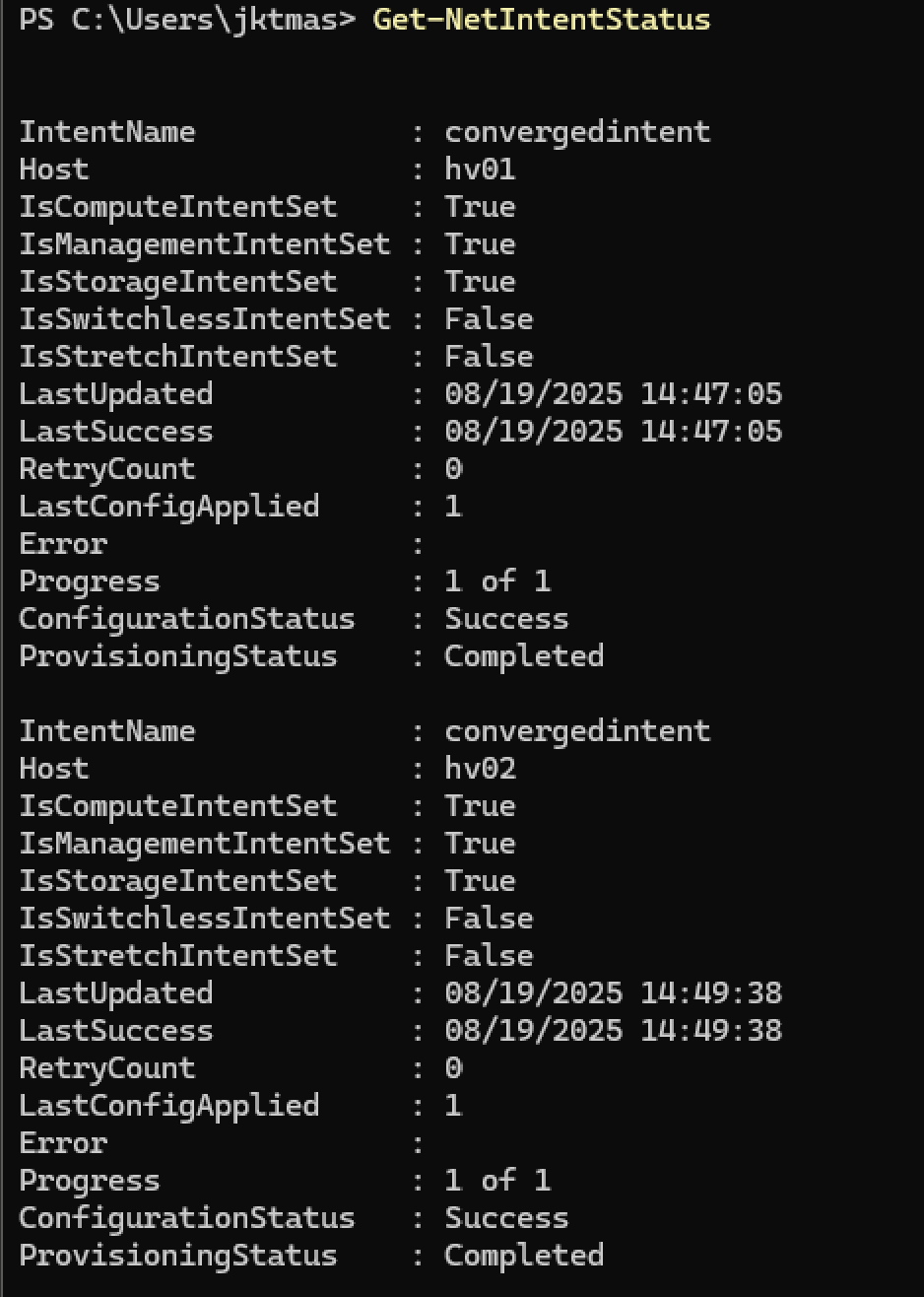
If you have more than a handfull of hosts, you may prefer this formatting:
1Get-NetIntentStatus | Select IntentName,Host,ConfigurationStatus,ProvisioningStatus,RetryCount,Error,LastSuccess,LastUpdated,LastConfigApplied |ftCheck the status of Global Overrides, which do not really display in Get-NetIntentStatus
1Get-NetIntentStatus -GlobalOverrides-
IF “Get-NetIntentStatus -GlobalOverrides” comes back with the Error “WindowsFeatureNotInstalled”, run this command then configure settings from WAC.
1Remove-NetIntent -GlobalOverrides -
If you’re looking for some alternate Network ATC setup configurations, Lee has a great blog post here: https://www.hciharrison.com/azure-stack-hci/network-atc/
Using Non-RDMA Nics
If you are trying to use non-RDMA Nics, Network ATC will fail to create a storage intent because RDMA is required. This is the same problem you’d have trying to use Network ATC in a VM. Here are the necessary overrides to make it work. DO NOT DO THIS IF YOU HAVE RDMA CAPABLE NICS.
1$Override = New-NetIntentAdapterPropertyOverrides
2$Override.JumboPacket = "9000"
3$Override.NetworkDirect = $false
Double checks, extra validation, and tidbits
-
I’ve seen plenty of weird things going on with WAC Network ATC. This is basically a list of good things to double check.
-
Double check that Network ATC extension works in WAC. Mine did not, and I had to add a different extension feed to get a newer version of Netowrk ATC than what was in the default feed.
- WAC > Settings > Extensions > Feeds > Add “https://aka.ms/sme-extension-feed"
- Install the newest Network ATC Extension.
-
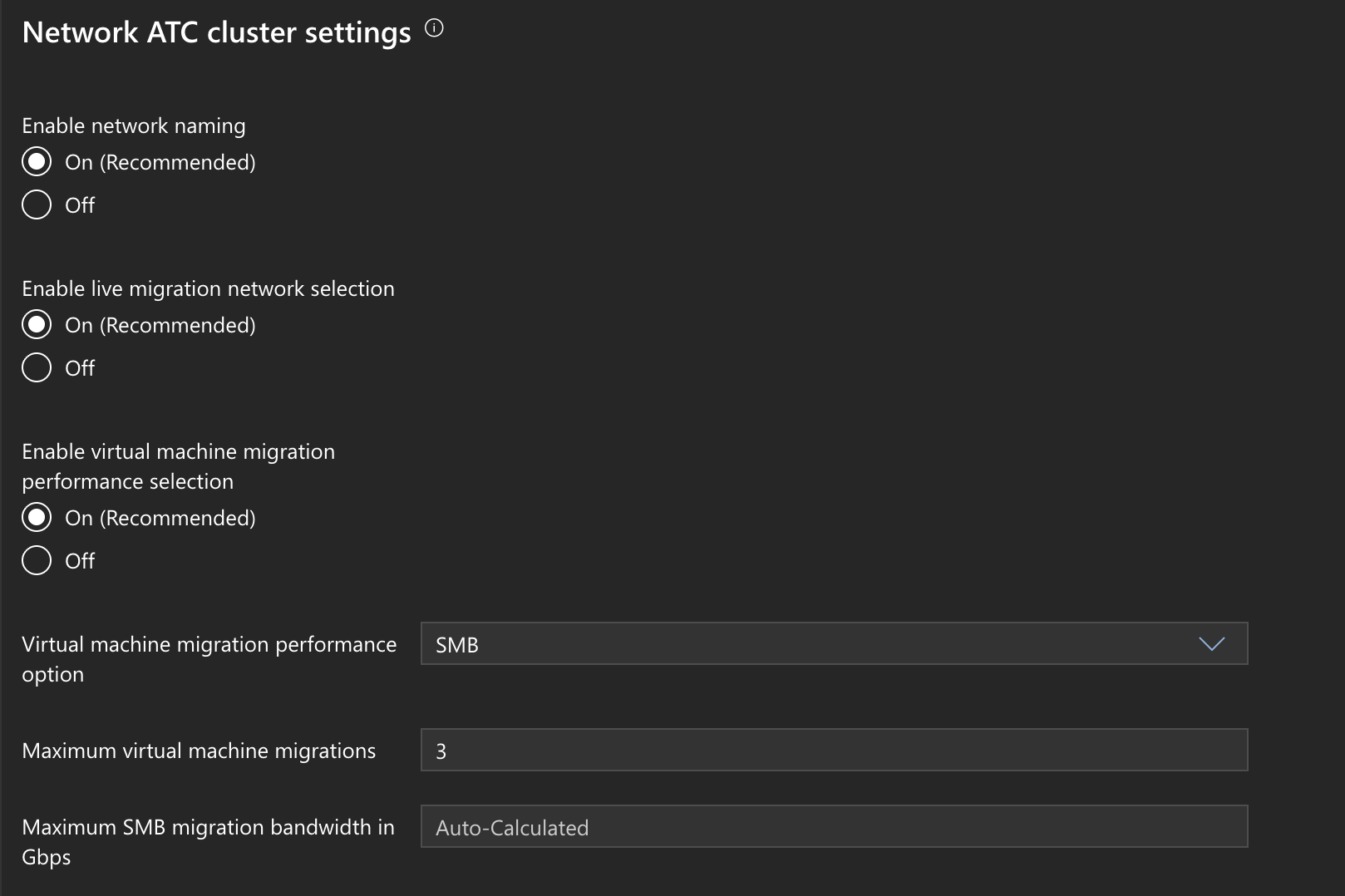
Double check Network ATC Global Overrides.
- WAC > Cluster > Network ATC CLuster Settings
-
Check SMB Multichannel
1Get-SmbMultichannelConnection -SmbInstance SBL